A320 Modes: 16- or 32-Channel
The A320 Personal Mixer has 16 mix channel buttons. Many people assume that this makes the A320 a 16-channel mixer. But it’s much more than that. Each button can be stereo if you have enough input sources, and that relates directly to better sounding monitor mixes. Here’s how you change the A320‘s modes. The A320 […]
How A320 Stereo Channels Work
Stereo channels are treated differently on the A320, based on which mode your Personal Mixer is in. The A320 is set for its 16-channel mode by default, making it easy to add an A320 to an existing personal mixing system that has a single input module or console card, or uses legacy A-16II Personal Mixers. […]
Expanding a Personal Mixing System Beyond 8 Users
When your performing ensemble grows beyond eight performers, it’s time for your personal mixing system to expand as well. Using A-Net makes that easy; there’s no practical limit to the size of an Aviom personal mixing system. We’ve seen systems that accommodated as many as 50 musicians at a time. That’s a lot of Cat-5 […]
Setting Up Network Mix Back
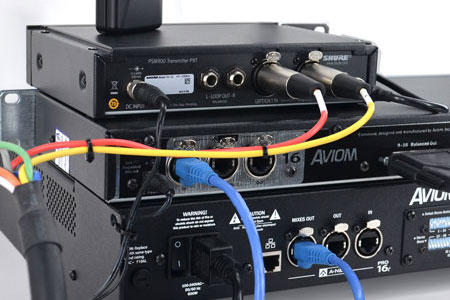
Network Mix Back makes it easy to use a wireless in-ear transmitter with an A640 or A360 Personal Mixer. Each A640 or A360 Personal Mixer connected to a D800 A-Net Distributor can send its stereo mix back into the network so that it can be connected to a Pro16 output device such as the AN-16/o […]
Mapping Stereo Links
The A640, A360, and A320 Personal Mixers support 16 stereo mix buttons (that’s 32 channels in all). When connecting and configuring inputs, it’s important to understand how the network inputs get mapped to the Personal Mixer channel buttons. It’s easiest to view each input device as having stereo input pairs (channels 1-2, 3-4, 5-6, etc.). […]
Beyond 16 Inputs, Part 1
Increasing the total input sources in your personal mixing system beyond the basic 16 channels allows you to get the most out of the A640, A320, and A360 Personal Mixers. These Personal Mixers are capable of utilizing a stereo input source (like a stereo piano or a drum submix) on a single channel button. The […]
Beyond 16 Inputs, Part 2
In Part 1 of this post we covered the expansion of a personal mixing system beyond the basic 16 inputs using multiple analog input modules for the input sources. Going beyond 16 input sources allows you to keep more content in stereo, and that can help you create more realistic monitor mixes on stage or in the […]
Beyond 16 Channels, Part 3
In this installment of our series on expanding a personal mixing system we will cover a hybrid system—one that uses an A-Net console card installed in a digital mixing console combined with an analog input module. As with the other methods discussed in Part 1 and Part 2 of this series, expanding your monitor mix content beyond 16 input […]
Beyond 16 Channels, Part 4
Expanding a personal mixing system is often coupled with other changes to a sound system. If you have an existing Aviom system and are changing to a new digital mixing console that is based on Dante networking (or at least has Dante as an option), then you may want to investigate switching to a Dante-based […]
Wireless In-Ears: Use The Right Cables
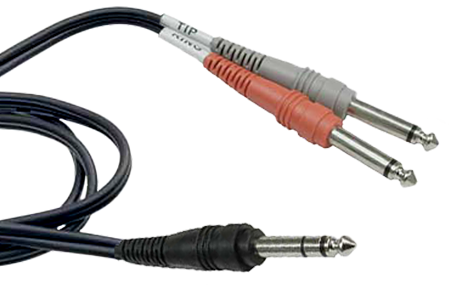
Personal Mixers are great tools for fixing the age-old problems caused by having monitor speakers on a stage. We frequently get questions about how to connect a Personal Mixer’s headphone output to a wireless in-ear transmitter system. This is easy to do, but you need to use the proper cables to get the job done. The […]